Have you ever run into these troubles when making a PPT?
You may have a clear idea in your mind, yet spend hours building outlines, arranging texts and searching for templates. When the deadline is around the corner, you are still adjusting fonts and aligning paragraphs page by page. Without design experience, your slides look plain and fail to impress your audience.
With the rapid development of AI office tools, more office workers and students are turning to Gamma PPT Chinese Version. It cuts the hours you spend on making slides down to just a few minutes. This is our first blog post on this site. Today we will take a full look at Gamma Chinese AI PPT tool and see how it helps you create professional presentations effortlessly.
What is Gamma PPT Chinese Version?
Gamma PPT Chinese Version is an online AI PPT generator built for users in China. Unlike traditional slide software that requires manual page-by-page editing, it is powered by AI. You can enter a topic, paste long articles or upload reference materials. The AI sorts out logic, breaks down outlines, generates content and finishes layout automatically. It is well suited for domestic scenarios including work reports, class presentations, startup pitches and training slides.
No software download is needed. You can access it directly in your browser. It is optimized for Chinese language understanding. You do not need complicated English prompts. Simply describe your needs in plain Chinese and you will get a complete first draft.
3 Simple Steps to Turn Your Ideas into a Full PPT
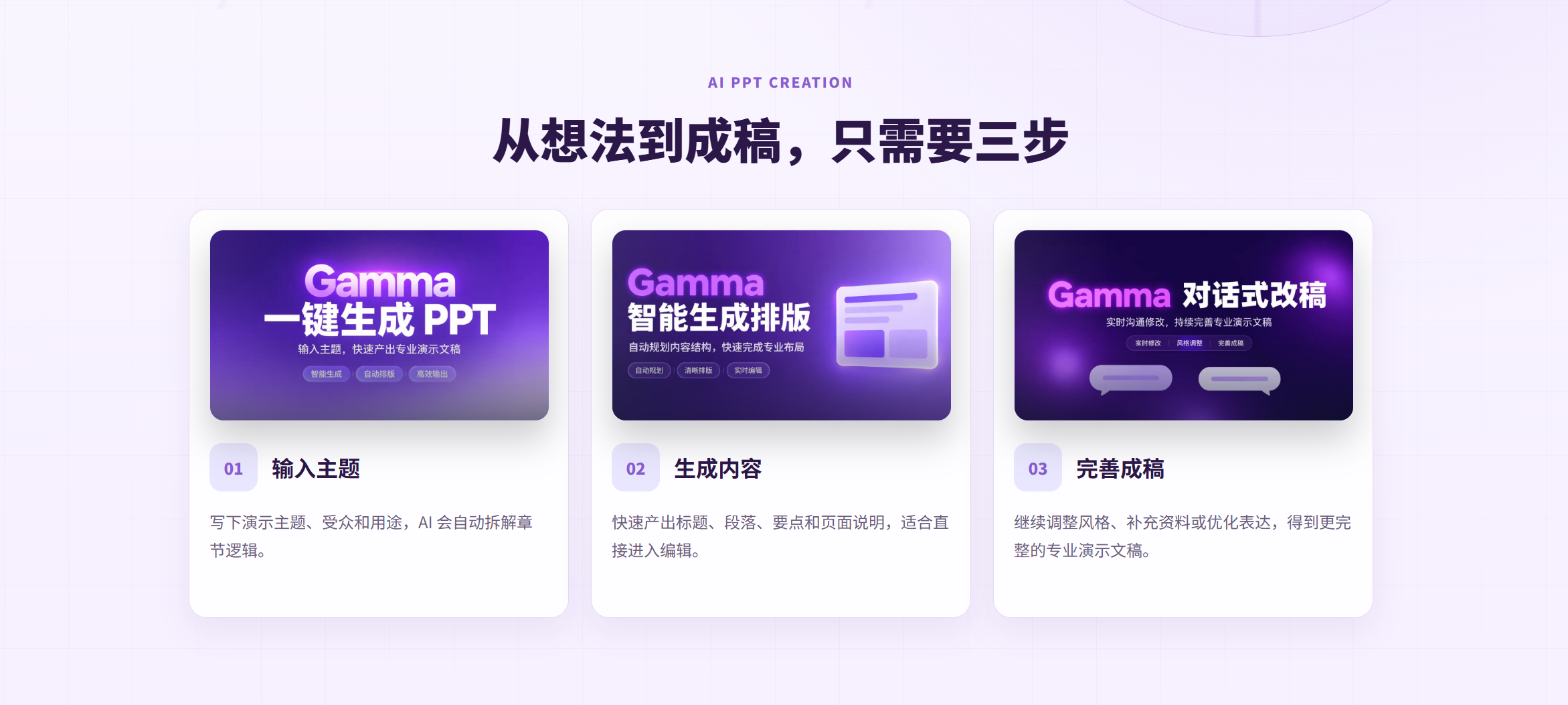
Many people worry that AI tools are hard to operate. Gamma PPT Chinese Version simplifies the whole workflow into three easy steps, friendly for total beginners.
Step 1: Enter your topic and tell AI your requirements
Type your PPT topic, and add details about your audience and usage scenario.
Example: Q3 work report for leadership, simple business style, focus on project results, existing problems and plans for the next quarter.
You can also paste full documents, research reports or lecture scripts. The AI will read and understand your content without you splitting chapters manually.
Step 2: AI generates a complete PPT in one click
Once you submit your request, the AI will organize the overall logic, create titles, chapters, key points and layouts for a ready-to-edit draft. You no longer need to start from a blank slide.
It is not just filling text mechanically. The AI arranges the narrative flow, separates pages and matches layouts. It solves the common pain point: struggling to build a PPT outline.
Step 3: Edit online and finalize your presentation
After the draft is ready, you can revise texts, switch template styles, add images and adjust layouts to customize single pages. When editing is done, export your file or get a shareable online link to finish your presentation.
Core Features of Gamma PPT Chinese Version
1. Massive premium templates for different scenarios
The platform comes with abundant templates for business reports, project proposals, teaching slides, tech pitches and defense presentations. You do not have to search for PPT templates online. Pick one inside the tool, or let AI match the best template for your topic automatically. Save time on downloading and unpacking template files.
2. Customize every page, avoid generic AI outputs
AI draft does not mean no editing. You can change text, color schemes, fonts and image arrangements for each slide. Optimize key pages separately. Use AI for fast drafting while keeping your original logic, so your slides will not look identical to other AI-generated works.
3. Multiple export options & cloud sync across devices
You can export presentations in different formats, or share slides via online links for team collaboration and remote presentations.
All your files are saved on the cloud. You can edit on computers, mobile phones and tablets. You can continue working on unfinished slides anytime anywhere without transferring files back and forth.
Who should use Gamma Chinese AI PPT?
- ✅ Office workers: Quarterly & annual reports, client proposals, project plans and internal training slides. Meet tight deadlines by generating drafts quickly, and spend more time polishing your business ideas instead of formatting.
- ✅ Students: Class presentations, coursework and graduation defense slides. Input your research materials and let AI build the framework for your defense presentation.
- ✅ Founders & freelancers: Business plans and pitch decks for investors. Iterate different versions fast and send the online link directly to investors.
- ✅ Teachers & trainers: Lesson slides and open-class presentations. Paste your lesson plans and turn them into slides instantly to save preparation time.
You do not need any design background. Gamma PPT Chinese Version is not meant to replace human thinking. It takes over repetitive work such as layout, outline building and material collection, so you can focus on your core message.
Practical Tips for Better AI Generation Results
- Add scenario, audience and style details instead of only a short title. Bad example: Marketing PPT Good example: New media marketing review for the marketing team, clean business style, highlight data performance.
- Paste full documents if you have ready materials. The AI will understand your content fully and produce a more logical outline.
- Always read through the AI draft carefully. Correct professional and business details before adjusting visual styles. Slides used directly without review may contain errors.
Final Words
Making a PPT used to mean hours of repetitive work on layout, template hunting and formatting. AI tools free us from this tedious labor so we can focus on communication.
Gamma PPT Chinese Version aims to deliver an AI PPT tool tailored for Chinese users. We want everyone to turn ideas into logical, good-looking presentations easily.
We will publish more tutorials, slide-making guides and prompt tips in future blog posts. Stay tuned. Click Generate Now to try AI PPT creation.
This is the first original blog post published on the blog section of https://www-gamma.cn/.